Let your Claude work out its own best setup
8 October 2026 · 2 min read
What happened
I promised a write-up on Opus as orchestrator with cheaper workers. So I tested it: 10 setups, five kinds of real work with hidden answer keys, judged blind by Opus 5.5 and Grok 4.7. Then I compared my results with what Anthropic and the published research say.
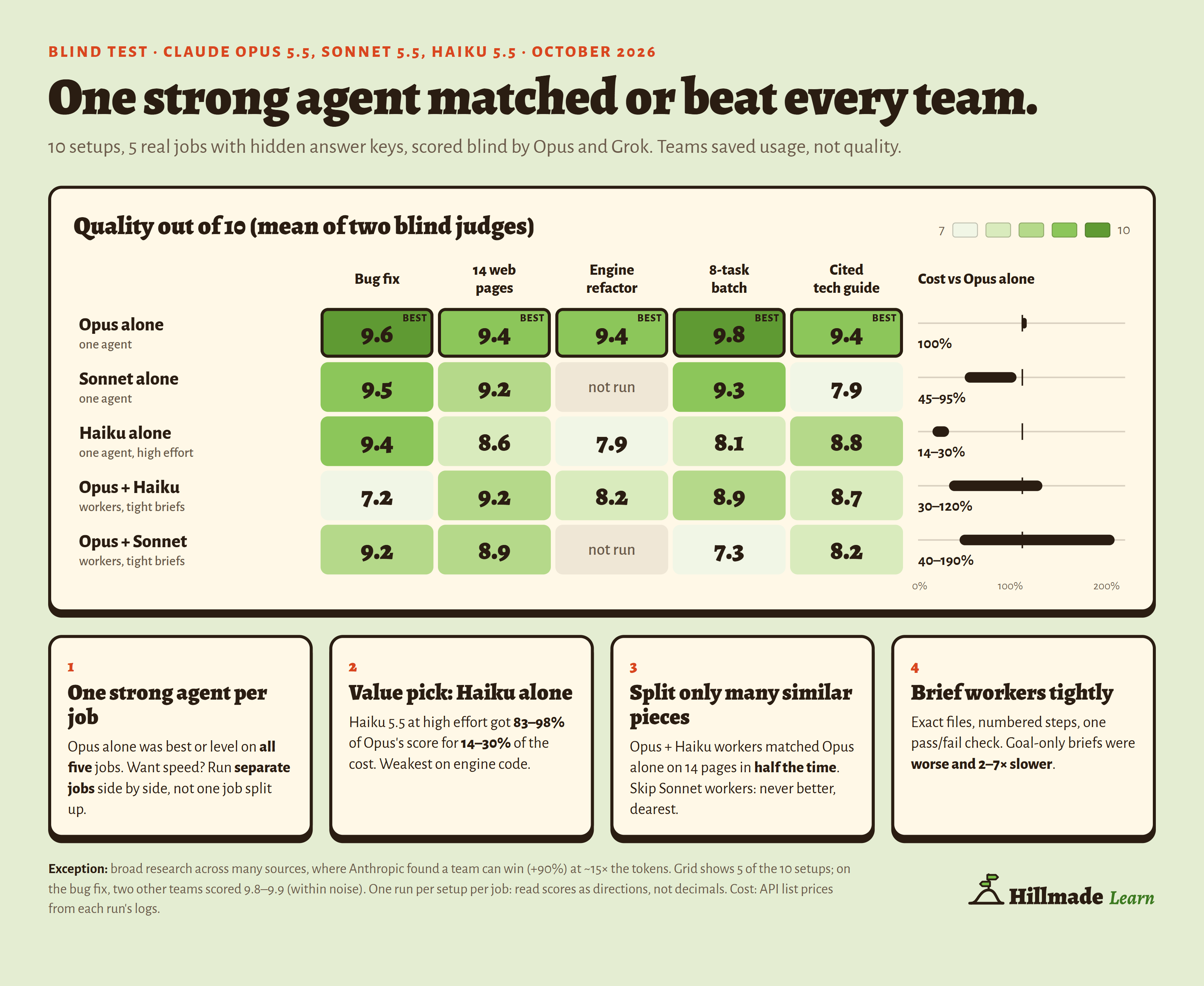
Short version: one strong agent (Opus 5.5) doing the whole job matched or beat every team on quality. Multi-agent teams save usage, and time when a job has many similar pieces. Broad research is the exception, where a team can win but costs far more. Haiku 5.5 on its own got 83 to 98% of Opus’s score for 14 to 30% of the cost.
But your work isn’t mine. So instead of my exact rules, here’s a prompt you give to your own Claude. It reviews your own sessions and writes rules for how you work.
Before and after
One rule for everyone
“Opus as orchestrator, Sonnet as workers, for everything.”
→ In my blind test, that team never beat one Opus doing the whole job, and it was the slowest and the most expensive.
Rules from your own work
“Review my recent sessions. Then write rules for which model, workers and effort I should use for each kind of job. Don’t apply anything until I say go.”
→ Your Claude writes rules from the work you actually do, plus one test to prove them on a real job of yours. The full prompt is below.
Why it works
No setup wins everywhere. In my test, one strong agent was best for coding and writing, a team only helped when a job had many similar pieces, and published research found teams win at broad research. Which of those matters depends on the jobs you actually give your AI.
So the prompt starts from the evidence, checks it against your own sessions, asks you the two things transcripts can’t show (quality or usage first, and whether you hit your limits), and then waits for your go.
The prompt
Paste all of it into a new chat or Claude Code session. It asks before it reads anything, and nothing changes until you reply “go”.
You will review how I work with you. Then you will write rules for me: which model to use, when to use workers and which effort level to set. Base your rules on my real work and on the evidence below. Do not copy the evidence as rules without a check against my work.

## Words in this prompt

- A worker is a sub-agent, a separate session or a separate chat that does part of a job.
- An orchestrator is the model that plans a job, writes the worker briefs and checks the results.
- A solo agent is one model that does all of a job.
- Effort is the thinking setting: low, medium, high, xhigh or max.

## Part 1: The evidence

These results come from a blind test in October 2026 and from published research. The test used Claude Opus 5.5, Sonnet 5.5 and Haiku 5.5. It had five kinds of work:

- A bug fix.
- A fix across 14 web pages.
- An engine refactor.
- A batch of 8 unrelated tasks.
- A technical guide with citations.

Two judges scored each result without the names of the setups.

1. A solo Opus agent got the best score or an equal best score on all five kinds of work. On the bug fix, two teams got scores 0.2 to 0.3 higher, which is within the noise of one run.
2. Teams saved usage. A team also saved time when the job had many similar units, for example many pages.
3. Workers lost context. For example, a worker did not read a recorded design decision. Published studies found the same problem.
4. A solo Haiku 5.5 agent at high effort got 83% to 98% of the Opus score. It used 14% to 30% of the Opus cost. Its lowest score was on engine code.
5. Opus with Haiku workers at high effort and tight briefs was the best team. On the 14 web pages, it got 9.2 out of 10. A solo Opus agent got 9.4. The team used half the time and 40% of the cost.
6. Opus with Sonnet workers was never better than Opus with Haiku workers. It was the slowest team and the team with the highest cost.
7. Tight briefs gave higher quality than goal-only briefs. Goal-only briefs took 2 to 7 times longer.
8. Haiku workers at medium effort gave poor results on the 14 web pages.
9. Anthropic measured one case where a team was much better than a solo agent: broad research across many sources. That team used about 15 times the tokens of a chat. The test above did not include this kind of work.
10. Anthropic and other teams report that a reviewer with a fresh context can find errors that the author missed. The test above did not measure this.
11. Each setup ran once on each kind of work. Token use for the same task can change a lot from run to run. Treat the numbers as directions, not exact values.

## Part 2: Review my work

1. Ask me for permission before you read my past sessions. Read them only on this computer or in this account. Do not send them to a different service. Do not copy passwords, keys or private text into your report.
2. Find my past sessions:
   - In Claude Code, the transcripts are JSONL files in `~/.claude/projects/`.
   - In the Claude app or on claude.ai, use the past-chats search tool if you have it.
   - If you cannot read past sessions, ask me the questions in step 6 instead.
3. Read no more than my 30 most recent sessions:
   - Count only sessions that I started.
   - Skip sessions that a plugin or a scheduled task started without me.
   - Treat headless sessions and sub-agent transcripts as workers of the session that started them.
   - If you can run code, write a small script that counts the data. Do not read every transcript in full.
   - In Claude Code transcripts, the model is in `message.model` and the token use is in `message.usage`. Sub-agent transcripts are in a `subagents` folder next to the session file. Count cache reads separately, because they cost much less.
4. For each session, record these items:
   - The kind of job. Use these kinds: one bug, a small change, a feature, shared code, many similar units, broad research, writing for people, admin or setup. Use "other" for all other jobs.
   - The models and the effort levels that the session used.
   - The number of workers, and the model of each worker.
   - The token use for each model, if the transcript shows it.
   - Signs of problems:
     - I told you that a result was wrong.
     - Someone reverted a change.
     - The same check failed again and again.
     - A worker did more than its brief.
5. Check that workers ran on the model that the brief asked for. Compare the model in the brief with the model in the worker transcript. Some tool versions ran all workers on the orchestrator model.
6. Always ask me questions 2 and 3 below, because transcripts do not show them. If you cannot read past sessions, ask me all five questions:
   1. Which kinds of job do you give me most often? Use the list in step 4.
   2. Which is more important to you: the best quality or lower usage?
   3. Do you often reach your usage limits?
   4. Do you run long jobs with no person at the screen?
   5. Which jobs went wrong in the past, and how?

## Part 3: Write my rules

1. Find my three most common kinds of job. Do not count "other".
2. For each kind of job, choose one setup. Start from the evidence in Part 1:
   - One bug or one small change: a solo agent. Use Haiku 5.5 at high effort if usage is important. Use Opus 5.5 if quality is more important.
   - A feature, shared code or engine code: a solo Opus 5.5 agent.
   - Many similar units: Opus 5.5 as orchestrator with Haiku 5.5 workers at high effort and tight briefs. Use this only if time is important. Otherwise use a solo agent.
   - Broad research across many sources: a team can be better. Tell me that it uses many more tokens.
   - Writing for people: a solo Opus 5.5 or Sonnet 5.5 agent.
   - Admin or setup: a solo agent. Use Haiku 5.5 at high effort for simple steps.
3. Change a choice only if my sessions show a clear reason. Write the reason in one sentence.
4. If a rule is different from an instruction that I already have, show me the two. Ask me which one to keep. Do not replace my instruction without my answer.
5. Set the effort for each choice. Opus 5.5 starts at medium. Medium is often enough. Use high for long or difficult work. Do not set Haiku workers below high effort.
6. If I use workers, add the tight brief rules:
   1. The exact paths that the worker can read.
   2. The exact paths that the worker can change.
   3. The steps in order, with numbers.
   4. One check: the command to run, and the output that shows a pass.
   5. An instruction to stop and report the raw output if the check fails.
7. If I run headless jobs in Claude Code, tell me to set the environment variable `CLAUDE_CODE_PRINT_BG_WAIT_CEILING_MS=0`. Without it, Claude Code stops background workers 10 minutes after the last turn of the orchestrator. Tell me to run only 2 or 3 headless sessions at the same time.
8. You may not be able to change your own model or start workers, for example in the Claude app. In that case, write the rules as advice to me. Tell me which model and effort to choose in the menu for each kind of job.

## Part 4: Your output

Give me these items in this order:

1. A short summary of my work: the kinds of job, how often each occurs and the problems you found. Use 150 words or fewer.
2. A table: kind of job, setup, effort and the reason.
3. A rules block that I can paste into my instructions (CLAUDE.md, project instructions or custom instructions). Use 300 words or fewer. Write it as instructions to Claude.
4. One test that I can do on a real job of mine. Run the job with two setups from the table. Compare quality, usage and time. If the result is different from your rule, change the rule.
5. A list of the things that you could not check.

## Part 5: Apply the rules

1. After you give me the items in Part 4, stop. Write this line: "Reply go to apply these rules, or tell me what to change."
2. Do not apply anything before I reply "go".
3. If I ask for changes, make them. Then write the line in step 1 again.
4. When I reply "go":
   - If you can edit my instructions file (for example, CLAUDE.md), add the rules block to it. Show me the file path and the text that you added.
   - If you cannot edit my instructions file, tell me exactly where to paste the rules block.
   - Do not change any other instruction that I have.
This tip started as a post on X.
Previous tip
Ask your AI where the time went
When an AI project feels slow, ask it to split the time into making, checking, fixing and waiting. The numbers tell you what to change.
Read itWant the basics?
The free lessons
Longer, step-by-step pages for getting started with AI in everyday life.
Start with the lessons